NevTan Engage

Features

Email MarketingSMS MarketingAutomations

Solutions

eCommerceSaaS & AppsB2B Lead GenAgencies

Resources

BlogHelp CenterDocumentationEmail TemplatesAPIFAQs

Company

AboutPricingContact

Legal

Data Processing AgreementSubprocessor ListAI & Data Usage PolicySecurity & Compliance

© 2026 NevTan Engage. All rights reserved.

Cookie Policy | Terms and Conditions | Privacy Policy

Skip to main content

Channels & Automation

Email Marketing

Beautiful campaigns that convert

SMS Marketing

Reach customers instantly

Automations

Visual drag-and-drop workflows

By Industry

eCommerce

Boost sales & reduce cart abandonment

SaaS & Apps

Onboard & retain users at scale

B2B Lead Gen

Nurture leads to conversion

Agencies

White-label for your clients

Plans & Pricing

Pricing Plans

Simple, transparent pricing

Learn & Build

Blog

Marketing tips and best practices

Email Marketing Templates

Ready-to-use campaign layouts

Documentation

Guides for every feature in Engage

API

Build custom integrations

About Us

Contact Us

LoginStart Free Trial(No card)

Getting started

  • Introduction
  • Create your account
  • Signing in
  • Your dashboard & navigation

Contacts

  • Contacts & profiles
  • Lists
  • Importing contacts
  • Segments
  • Suppression list

Campaigns

  • Campaigns overview
  • Create & send a campaign
  • Reading a campaign's results

Templates

  • Template library
  • Create with AI
  • The template editor
  • Template approval

Automations

  • Built-in flows
  • Custom flows

Analytics

  • Contact Growth
  • Campaign Reports
  • Automation Reports
  • Metrics glossary

Integrations

  • Webhooks

Account & billing

  • Your profile
  • Custom sending domains
  • Plans & pricing
  • Billing, usage & invoices
  • Team & roles

Administration

  • Admin overview
  • Campaign & template review
  • Customers & packages

Documentation/Campaigns

Campaigns overview

The campaigns list, statuses, and how sending works.

A campaign is a one-off message to a chosen audience — a newsletter, an announcement, a promotion. For messages that send themselves in response to behaviour, use flows instead.

The campaigns list

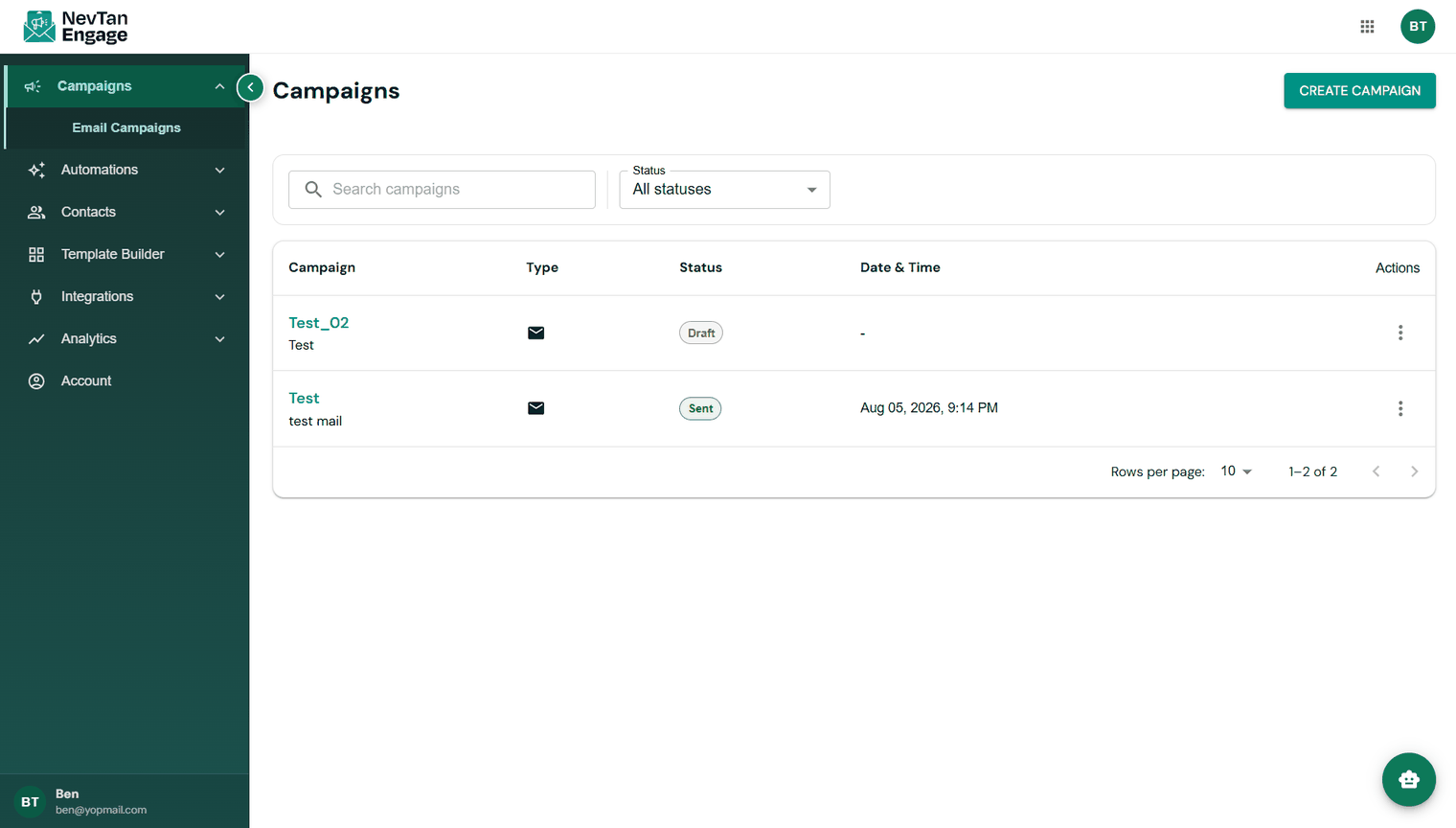
Open Campaigns → Email Campaigns. Every campaign you've created is listed with:

ColumnDescription
CampaignThe campaign name (internal — recipients never see it)
TypeThe channel
StatusWhere it is in its lifecycle
Date & TimeWhen it was created, scheduled, or sent
ActionsEdit message, Edit details, View Activity, Delete — plus a Send / Schedule button once the campaign is approved
The campaigns list showing several statuses

Your campaigns

Search by name, or use the Status filter to show only drafts, scheduled, or sent campaigns.

Campaign statuses

StatusMeaning
DraftStill being built — not sent
Pending for approvalSubmitted and waiting for review
ApprovedCleared to send or schedule
ScheduledQueued to send at a future time
SendingCurrently going out
Sent / CompletedDelivered to the audience
Failed / RejectedThe send failed, or the review was rejected

The lifecycle

Every campaign follows the same path: create → choose recipients → build the message → submit for review → schedule or send → measure. The next article walks through all of it.

Create & send a campaign

The full step-by-step walkthrough.

Reading a campaign's results

Read your results once it's out.

Previous

Suppression list

Next

Create & send a campaign

Still need a hand?

Our support team usually replies within one business day.

Contact support

On this page

  • The campaigns list
  • Campaign statuses
  • The lifecycle